
The following tables list the granular level rights that are automatically assigned when you assign one or more global User Rights. In this topic, global User Rights refers to Permissions available when you select the User Rights option from the View drop-down list of a group account's System Rights page.
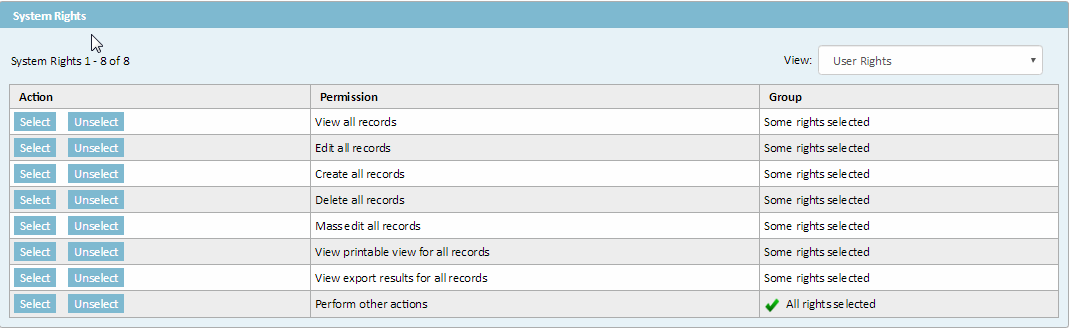
Group - System Rights Page with User Rights View (Edit View)
The following table displays rights assigned from the group System Rights page when the View drop-down list User Rights option is selected and the View All Records permission displays the status All Rights Selected.
Rights Assigned with View all records Permission (for global User Rights)
Record Type |
Individual Right |
Account |
•View Account records •View Account all categories •View Account all custom fields •View Account security •View Account all transactions |
Appointment |
•View Appointment records •View Appointment all categories •View Appointment all custom fields •View Appointment security •View Appointment Resources |
Contact |
•View Contact records •View Contact all categories •View Contact all custom fields •View Contact involvement •View Contact rates •View Contact relations •View Contact security •View Contact skills •View Contact territories |
Documents |
•View Document records •View Document all categories •View Document all custom fields •View Document security |
Expenses |
•View Expense records •View Expense all categories •View Expense all custom fields •View Expense security |
History |
•View History records •View History all categories •View History all custom fields •View History security |
Invoice |
•View Invoice records •View Invoice all categories •View Invoice all custom fields •View Line Item records •View Line Item all categories •View Line Item all custom fields •View Invoice security |
Preferences |
•View Preferences |
Report |
•View Report records |
Task |
•View Task records •View Task assignees •View Task all categories •View Task all custom fields •View Task security |
Scheduled Actions |
•View Scheduled Actions records |
The following table displays rights assigned from the group System Rights page when the View drop-down list User Rights option is selected and the Edit All Records permission displays the status All Rights Selected.
Rights Assigned with Edit all records Permission (from global User Rights)
Record Type |
Individual Right |
Account |
•Edit Account records •Edit Account all custom fields •Edit Account security |
Appointment |
•Edit Appointment records •Edit Appointment all custom fields •Edit Appointment security •Edit Appointment Attendees •Edit Appointment Resources |
Contact |
•Edit Contact records •Edit Contact all custom fields •Edit Contact rates •Edit Contact security •Edit Contact skills |
Documents |
•Edit Document records •Edit Document all custom fields •Edit Document security |
Expenses |
•Edit Expense records •Edit Expense all custom fields •Edit Expense security |
History |
•Edit History records •Edit History all custom fields •Edit History security |
Invoice |
•Edit Invoice records •Edit Invoice all custom fields •Edit Line Item records •Edit Line Item all custom fields •Edit Invoice security |
Preferences |
•Edit Preferences |
Report |
•Edit Report records •Edit Report security |
Task |
•Edit Task records •Edit Task assignees •Edit Task all categories •Edit Task all custom fields •Edit Task security |
The following table displays rights assigned from the group System Rights page when the View drop-down list User Rights option is selected and the Create All Records permission displays the status All Rights Selected.
Rights Assigned with Create all records Permission (from global User Rights)
Record Type |
Individual Right |
Account |
•Create Account records •Create Account all categories •Create Account all transactions |
Appointment |
•Create Appointment records •Create Appointment all categories •Create Appointment Attendees •Create Appointment Resources |
Contact |
•Create Contact records •Create Contact all categories •Create Contact rates •Create Contact relations •Create Contact skills •Create Contact territories |
Documents |
•Create Document records •Create Document all categories |
Expenses |
•Create Expense records •Create Expense all categories |
History |
•Create History records •Create History all categories |
Invoice |
•Create Invoice records •Create Invoice all categories •Create Line Item records •Create Line Item all categories |
Task |
•Create Task records •Create Task all categories |
The following table displays rights assigned from the group System Rights page when the View drop-down list User Rights option is selected and the Delete All Records permission displays the status All Rights Selected.
Rights Assigned with Delete all records Permission (from global User Rights)
Record Type |
Individual Right |
Account |
•Delete Account records •Delete Account all categories |
Appointment |
•Delete Appointment records •Delete Appointment all categories •Delete Appointment Attendees •Delete Appointment Resources |
Contact |
•Delete Contact records •Delete Contact all categories •Delete Contact rates •Delete Contact relations •Delete Contact skills •Delete Contact territories |
Documents |
•Delete Document records •Delete Document all categories |
Expenses |
•Delete Expense records •Delete Expense all categories |
History |
•Delete History records •Delete History all categories |
Invoice |
•Delete Invoice records •Delete Invoice all categories •Delete Line Item records •Delete Line Item all categories |
Task |
•Delete Task records •Delete Task all categories |
Scheduled Actions |
•Delete Scheduled Actions records |
The following table displays rights assigned from the group System Rights page when the View drop-down list User Rights option is selected and the Perform other actions permission displays the status All Rights Selected.
Rights Assigned with Perform other actions Permission (from global User Rights)
Record Type |
Individual Right |
Appointment |
•Scheduler Tool |
Documents |
•View letter generation •View XML generation •View template data mapping •View version •Revert version |
Expenses |
•Post Expense •Void Expense |
Invoice |
•Post Invoice •Void Invoice |
Task |
•Post Task •Void Task •Assign Task |

