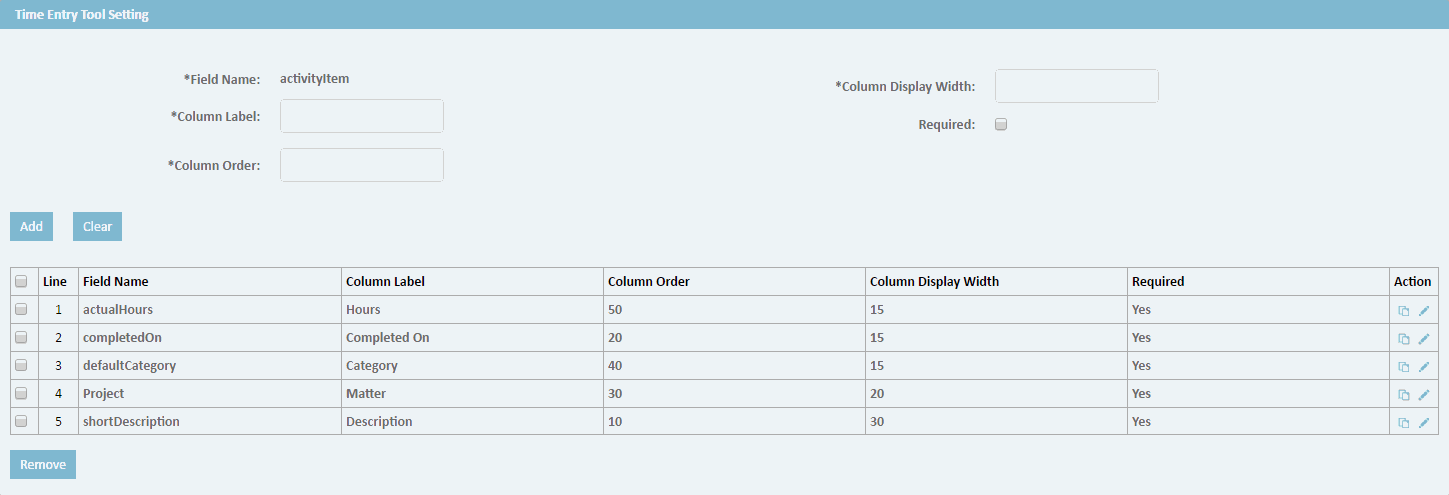
You can change how Time Entry Tool fields display and whether the fields are required by users.
1.Click the Time Entry Settings link under the All tab in the upper-right of TeamConnect. Click the Edit Record icon  . The following fields are on the General page, Time Entry Tool Setting section. . The following fields are on the General page, Time Entry Tool Setting section.
1.To change the text that displays for default fields on the Time Entry Tool: a.Select the check-box(es) next to the existing Field Name and click edit. b.Type the new text to identify the field in the Column Label box. c.Click ok on that field row. 2.To change the position of a Time Entry Tool field from left to right: a.Select the check-box(es) next to the existing Field Name and click edit. b.Type a numeric value in the Column Order box, where the lowest value displays furthest to the left and the highest value displays furthest to the right on the screen. c.Click ok on that field row. 3.To change the maximum length for displaying the field's Column Label: a.Select the check-box(es) next to the existing Field Name and click edit. b.Type a numeric value in the Column Display Width box. This value determines the length of space allotted to display the corresponding Time Entry Tool field value. For example, for the actualHours field, the default Column Display Width of 6 would allow a Time Entry Tool user to enter a value like 100.25 c.Click ok on that field row. 4.To set whether an existing Time Entry Tool field is required by users to complete: a.Select the check-box(es) next to the existing Field Name and click edit. b.Clear the Required check-box to display the field but allow blank values, or select the Required check-box to prevent saving this field with blank values. c.Click ok on that field row. 5.To display the activityItem field on the Time Entry Tool: a.From the Number of entries you would like to add: drop-down list, select 1. b.From the Field Name drop-down list, select activityItem. c.Type a descriptive field label in Column Label box (for example, Task Activity). d.Type the field's Column Order (number). e.Type the Column Display Width. f.Select the Required check-box. See field explanations above for more information. 6.Click a save option. |